


Cornerstone Content Report
What is cornerstone content?
Cornerstone content refers to the most important and valuable content on your website. Understanding what content your users prioritize helps you optimize your content, prepare for AI adoption and improve generative performance on your site, and keep your most-referenced content updated for a smoother UX and higher customer satisfaction.
How are articles captured for the Cornerstone Content report?
Each week, NiCE KM captures the top 100 performing article pages (not category or guide pages). Performance at this time is indicated by number of page views. The remaining metrics are captured from those article pages and included in the report. As the metrics are captured only when the article performs in the top 100, it will result in potentially different totals than the Page Views report. The intent of this report is to capture which articles have the highest engagement and when that content was last updated.
Access the Cornerstone Content report
Navigate to Site tools > Dashboard > Site Reports > Cornerstone Content.
- The Cornerstone Content report can be accessed by Admin users.
- The report includes export options to download or email the data.
- The report data begins from January 2025.

Report components
Export options
All of the export options can be found in the Dashboard Actions menu.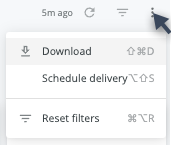
- Download as:
- CSV
- Schedule Delivery (email reports instantly or on a schedule)
Filters and Reload
- Date returns data for a specific date or date range.
- User Type pulls information for Seated or Anonymous users.
- Page Location filters for a specific page, set of pages, or section of the site.
- Use any preset filter in the dropdown and select one or multiple articles
- To avoid multi-select, use Matches(Advanced) filter
- Matches(Advanced) %Name% to filter for any article that contains a word or phrase
- Matches(Advanced) Name% to filter for any article that starts with a word or phrase
- Example: to filter for any articles within Manage category, use Matches(Advanced) %Manage%
- Please note that filter is case sensitve
- Article Type subsets content by topic, reference, how-to, and other custom-classified articles.
- Engagement Channel filters users from search, referral, direct, or specific Touchpoints.
- Reload

- Show/hide filters

- Reset filters option (located in the Dashboard Actions menu)
Data
Table
- Page ID
- Page Location (page path)
- Category - Where in the IA the page lives; this helps you identify what sections of your site have the most engagement.
- Sub-Category - Where in the IA the page lives; this helps you identify what sections of your site have the most engagement.
- Last Update Date - The date of the last update event within 1 year of the current date.
- Update Status
- Edited over a year ago: Null Last Update Date. This indicates that the page has not an update event within the last year.
- Recently edited: Last Update Date is not null. This indicates that the page has an update event within the last year.
- Never edited: No update event exists for the page.
- Cornerstone Views: All - Count of all page views for that page only when the page ranked in top 100 as Cornerstone.
- Cornerstone Views: Landing - Counted when the page is the first page path in a user session only when the page ranked in top 100 as Cornerstone. This indicates where the user started their journey.
- Cornerstone Views: Search - Counted when a page view immediately follows the Search page only when the page ranked in top 100 as Cornerstone. This indicates that the page is important to the traditional search experience.
- GenSearch Source Articles - Counted when the article is used as a source article in a GenSearch response only when the page ranked in top 100 as Cornerstone. This indicates that the page is important to the GenSearch experience.
- Weeks - Captures the start date of the week(s) when the article ranked as cornerstone.
