


Conditional Content Analysis Download
- Applies to:
- CXone Mpower Expert (current)
- Role required:
- Admin
The Conditional Content Analysis Download provides a CSV with the locations of all conditional content across the site.
The Conditional Content Analysis Report is available in downloadable CSV format only. At this time, there is no in-dashboard visualization of conditional content locations.
Access the Conditional Content Analysis download
There are two ways to access the report.
- Navigate to Site tools > Dashboard > Site Reports > Conditional Content Analysis Report.

- Navigate from an in-page conditional content search-compatibility warning:
.png?revision=3)
- Click Download to download the Conditional Content Analysis report.
Report download
The CSV download contains all page locations with conditional content.
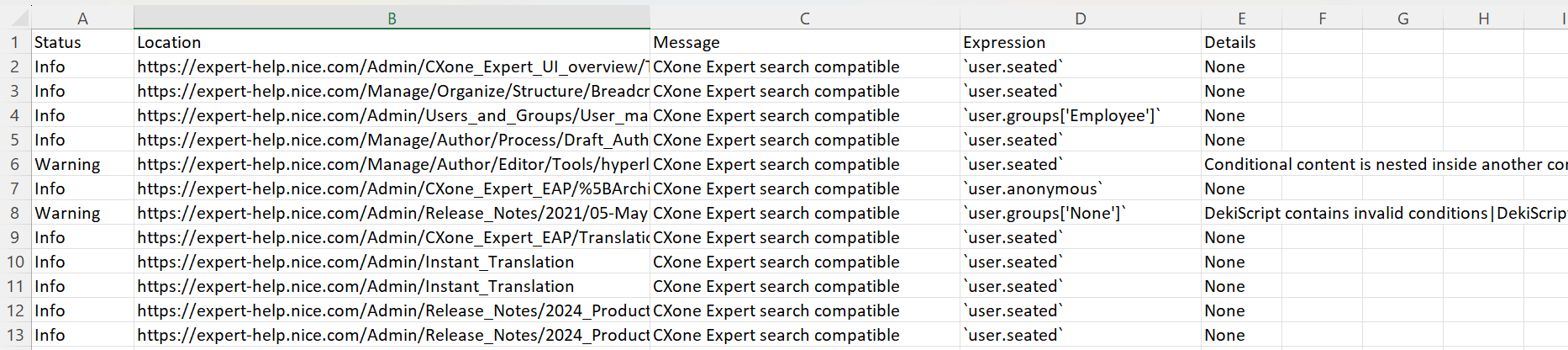
Report details
| Field | Type | Description |
|---|---|---|
| Status | string | Is there a problem with the conditional content at the page location?
|
| Location | string | The page location URL |
| Message | string | A description that provides context for the Status field |
| Expression | string | The DekiScript or Editor Toolbar code that is powering the conditional content |
| Details | string | Detailed explanation of any conditional content warning |