


Get a Server API Token
- Applies to:
- All versions
- Role required:
- Admin
Navigate to the API Token Management dashboard
- Navigate to Site tools > Dashboard > Integrations > API Token Management.
- If you cannot find an API token Management link under Integrations, contact your Customer Success Manager to enable the feature.
Generate a Server API token
- In the Add an API token section, select the Server radio button.
- Enter a Name for the token that is easy to track and manage.
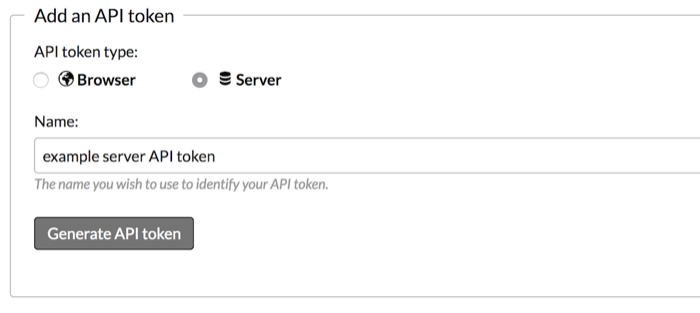
- Click Generate API token.
- Record the API token information and copy your API token secret to a safe location.
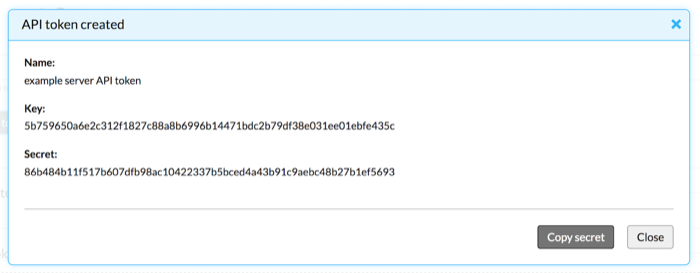
Do not close the "API Token created" window without copying and recording your secret. Your API Token key will not function without your secret, and your secret will no longer be accessible once the window is closed. Both the key and the secret are necessary for integrating with the Expert API, so do not lose them.
Long-term JSON Web Tokens (OAuth bearer tokens)
When creating Server API tokens, you can generate a one-time long-lived JWT scoped to a specific user.
Only Server tokens can be assigned to a user. Browser and OAuth tokens cannot be assigned to a specific user.
For apps that need it, a long-term JWT (also called an OAuth bearer token) can be created at the same time as the server token key and secret. This allows authentication to be set by user, tenant, or group, which provides flexibility without compromising security.
Upon creation of a new server token, an OAuth bearer token is returned immediately. This is a one-time issuance and the token has a 10-year expiration.
You can see your server tokens in the Dashboard, but because the JWTs are not visible we advise you to name the server token to indicate that an OAuth bearer token is associated with it. If there is an issue with an OAuth bearer token, this indicates the server token should be removed and a new server token / long-term JWT should be obtained.
Create an OAuth bearer token in the Dashboard
To create an OAuth bearer token:
- Select Server as the token type.
- Enter token name.
- Check the box for Generate long‑term JWT (OAuth bearer token).
- (optional) Search for and select a user in Restricted to user.
- (optional) Set the JWT expiration. The default timeframe is 10 years.
- Click the Generate API token button.
- Copy the generated JWT.
Create an OAuth bearer token in Postman
You can run similar code in Postman to create a server token at /@api/deki/site/developer-tokens.
<developer-token type='server'>
    <name>foo</name>
    <restricted-by-user-id>1</restricted-by-user-id>
</developer-token>
Example of created server token with JWT:
{"@id":"9","@type":"server","@date":"Wed, 19 Feb 2025 17:20:49 GMT","@href":"https://spencersso.mindtouch.es/@api/deki/site/developer-tokens/9","authorization":"Bearer eyJhbGciOiJIUzUxMiIsImtpZCI6IjkiLCJ0eXAiOiJKV1QifQ.eyJzdWIiOiJhMmFkNDU0YjYwMTI1MTI5NjQ0YjdkYjk0MTZiNWYzY2I3NzE3ZDUwMDAwYzM4OTVlZGI2OGRhZDU1ZTAwYzU3IiwiYXVkIjoiYXV0aC1zZXJ2aWNlLVNlcnZlciIsImV4cCI6IjIwNTU1MTg0NDkiLCJpc3MiOiJodHRwczovL3NwZW5jZXJzc28ubWluZHRvdWNoLmVzLyIsImlhdCI6IjE3Mzk5ODU2NDkiLCJuYmYiOiIxNzM5OTg1NjQ4In0.R7koEcEyFnzTdFQ9APHlaLp8FtVrKP9hQOqou3qiVsi0ClHRRWljtzLOPCrR48QcLQ9GivUh6wJ0sd5Cr7rj9Q","key":"a2ad454b60125129644b7db9416b5f3cb7717d50000c3895edb68dad55e00c57","name":"foo jwt","restricted-by-user-id":"1","secret":"18c19f9b2663d2aefe4170b8346aa3303365382bb09c5f235f5c72310ea8ff6d"}
Here is an example script on GitHub to try out.
Use the OAuth bearer token in API calls
Once you have the JWT, pass it as an Authorization HTTP header on every API request:
Authorization: Bearer <your-jwt>
Example curl request using the JWT:
curl -s "https://your-site.mindtouch.us/@api/deki/pages/home/contents" \
  -H "Authorization: Bearer eyJhbGciOiJIUzUxMiIs..."
The JWT authenticates as the user specified in Restricted to user at token creation time. No key/secret signing is required per request.
Revoking a Server API token
To revoke a server token and invalidate its associated JWT, use Site tools > Dashboard > Integrations > API Token Management by clicking the delete icon next to the token.
Revoking the server token immediately invalidates the associated JWT. Any API calls using the revoked JWT will return a 403 Forbidden response. If an OAuth bearer token is compromised, revoke the server token and generate a new server token / long-term JWT pair.
Troubleshooting
| Error or symptom | Likely cause | Resolution |
|---|---|---|
403 Forbidden — "invalid json web token" |
The server token was revoked after the JWT was issued, or the JWT has been tampered with | Delete the server token in the Dashboard and generate a new server token / JWT pair |
403 Forbidden — "invalid user requesting" |
The user bound to the token has been deactivated or lost their license seat | Reactivate the user or assign them a license seat, then test again. If the user should remain inactive, generate a new JWT scoped to a different active user |
403 Forbidden — "Unable to parse JWT token" |
The Authorization: Bearer value is malformed or truncated |
Verify the full JWT string is being sent without line breaks or extra characters |
| JWT appears to work in Postman but not in code | The Authorization header is being dropped or the prefix Bearer (with a space) is missing |
Ensure the header value is exactly Bearer <jwt> with a single space after Bearer |
| JWT expires unexpectedly | The token was issued against a server token created before 2025. Older tokens may have had a shorter expiration | Generate a new server token / JWT pair; new JWTs have a 10-year expiration from creation date |
Security best practices
- Store JWTs server-side. Treat JWTs like passwords. Store them in a secrets manager (e.g., AWS Secrets Manager, HashiCorp Vault) — never in source code or client-side JavaScript.
- Name tokens clearly. Use a name that identifies the integration and the bound user, for example
Zendesk-Integration-ServiceAccount. This makes auditing easier. - Rotate when team members leave. If a team member who had access to the JWT leaves, revoke the server token and issue a new one.
- Use one token per integration. Do not share a single JWT across multiple integrations. Separate tokens allow you to revoke one without disrupting others.
- Monitor for unauthorized use. Review API Token Management regularly and revoke any tokens that are no longer in use.