


January 2026 Releases
Release 2026-01-29
This release is complete. The Release was deployed to all Expert sites as of 7:43 PM (PST) on February 2.
Enhancements
GenSearch reporting
For customers with GenSearch enabled, the Content Adequacy and Faithfulness & Relevancy downloads have been added to GenSearch settings in the Dashboard.
Let us know if you do not have these features enabled and would like them for your site.
Enhanced Editor spellcheck
You can now select the language you want to use for spellcheck within the Editor.
Cornerstone Content report
The Weeks column has been added to the report. This column provides the start date of the weeks where the article ranked as cornerstone content.
Release 2026-01-22
This release is complete. The Release was deployed to all sites as of 10:34 PM (PST).
Today's release included essential backend enhancements designed to maintain product performance and lay the groundwork for upcoming features.
Release 2026-01-15
This release is complete. The Release was deployed to all sites as of 12:21 AM (PST) on January 16.
Enhancement
Cornerstone Content report
- The report now shows the top 100 articles.
- To eliminate discrepancies with the Page Views report, the column header has been updated to indicate that views, views from Search, and landing view data is only for when the article ranked as cornerstone content.
Release 2026-01-08
This release is complete. The Release was deployed to all sites as of 7:54 PM (PST) on January 12.
Fixes
Unpublish modal
Before, the "Unpublish now" text did not display when the Hawthorn theme was enabled on a site and published sub-pages were present. We have fixed this so the modal displays as expected.
Before: 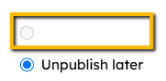
Agent integration
Previously, the integration would not load until the browser window size was adjusted. We have resolved this so the Agent integration loads as the user accesses the Custom Workspace.
Enhancement
Pinned Pages
You can now sort your pinned pages so they are better organized to suit your workflow and needs.
Sort alphabetically (A-Z or Z-A), by recently / oldest added.