


August 2026 Releases
Release 2026-08-27
This release is complete. The Release was deployed to all sites in all regions.
Fixes
Content reuse
Reusing a section from a page whose title contained a double quotation mark caused the destination page to not render. Now, page titles containing quotation marks are handled correctly.
Site export
Previously, a full site export could run for up to 12 hours, then fail silently when the exported content exceeded the size limit with no explanation provided. Now, oversized exports are detected before the export job begins, so they fail immediately with a clear explanation.
Enhancement
Custom Site CSS moved to Dashboard
You now have the option to have your site's Custom Site CSS fields moved from the Control Panel to the Dashboard under Site Administration for easier use. Reach out to us to enable this functionality.
Release 2026-08-20
This release is complete. The Release was deployed to all EU / CA / AU sites. The release has not been deployed to US sites.
Fixes
Page and draft reverts
Previously, reverting a page or draft that spanned several revisions or many attachments could timeout and cause the revert to stop partway through, which would leave the page only partially reverted. Now, reverts are given the time needed to finish so they complete fully.
SCIM provisioning
Before, when Microsoft Entra ID sent a directory sync update that changed one entry within a multi-valued attribute (for example, a single address within a list of addresses), the update was rejected and any unrelated fields in that request were also rejected. Now, these updates are accepted and applied to the correct entry, so Entra ID sync completes as expected.
Announcement
Import group permissions
We have updated our import documentation to make page-level permissions on imported pages clearer. Imported pages have group page-level permissions that were inconsistent with the source site permissions for that page. This is because when a page is imported under a parent page, it inherits the parent's group grants on top of its own page-level permissions. Importantly, the source page's privacy level is always preserved, which ensures no privacy downgrade or anonymous exposure occurs.
Release 2026-08-13
This release is complete. The Release was deployed to all sites as of 4:04 AM (PST) on August 14.
Fixes
Find & Replace
Previously, Find & Replace silently skipped occurrences of a phrase when the phrase's opening or closing punctuation was immediately followed or preceded by punctuation with no space between them. For example, "Work From Home (WFH)." where the closing parenthesis is followed by a period. Now, the phrase is replaced and adjacent punctuation is left as-is.
Enhanced Editor tables
Before, when a comment was added to a table cell after deleting an image from that cell, the comment was applied to the adjacent column instead of the intended one. Now comments remain in the correct cell after an image is deleted, so the comment is applied where it was added.
Conditional content in GenSearch
Previously, GenSearch did not index or include conditional content in responses and source lists. Now, GenSearch indexes conditional content for authorized users, providing complete and relevant search results that adhere to user permissions.
Webhooks admin enforcement
Previously, the Webhooks REST endpoints were documented as admin-only but did not always enforce that restriction. Now, all Webhooks endpoints require admin access, consistent with their documented behavior.
SSO Self Service SAML/OIDC form
Previously, the Single Sign-On Configuration page had an invalid field (service-name) that caused errors, and missing placeholder / instruction text for create-form write-only fields. We have removed the service-name field, and added "Enter a new value" placeholder text to the create-form write-only fields. This makes the UI easier to use, and prevents the errors that were generated.
SCIM discovery endpoints
Before, the SCIM discovery endpoints required authentication, which is inconsistent with RFC 7644 §3.2 and blocked standard SCIM client compatibility checks. Now these three read-only discovery endpoints can be read without credentials on sites with SCIM enabled. The endpoints remain authenticated.
SCIM group membership provisioning
Before, when an IdP sent a group update that contained a member reference that could not be resolved, the request was silently accepted and returned success, but the member was never added to the group. Now, an unresolvable member reference returns a clear error so provisioning failures are visible.
CXone IdP
Previously, updating any single field on a CXone-provisioned Identity Provider (IdP) would fail. Additionally, newly provisioned CXone IdPs were missing the setting that tells the provider how to present credentials, which caused sign-in to fail. We have resolved both issues.
Enhancements
Self-service OpenAPI spec
The OpenAPI 3.0 specification for your site is now generated on demand at GET:swagger, without needing an external tool. This is enabled by default.
Configurable developer token expiration
Server developer tokens created via POST:site/developer-tokens can now specify an expiration period in years, instead of using a fixed 10-year lifetime.
AI response speed
Our AI-powered features (GenSearch, EditorAI Assistant) in the CA and AU regions now use a faster underlying model, which reduces typical response times.
Release 2026-08-06
This release is complete. The Release was deployed to all sites as of 12:00 AM (PST) on August 8.
Fixes
GenSearch in the CRM Touchpoint
Before, when GenSearch was enabled for set user groups, the GenSearch option showed in the CRM Touchpoint. Now only users who are part of a permissioned group can see GenSearch.
CSS
Before, CSS was not rendered correctly on some sites based on the region users viewed the site from. Now CSS works as expected regardless of region.
Tables
- Previously, when a user pasted rows into a table,
<p>tags were added to the bottom of the page. This caused unnecessary white space in the document. Now no spaces are added when rows are pasted into a table. - Tables were not displaying correctly on mobile when "responsive" was selected. We have fixed this so tables display correctly on all devices.
Page and content length CSV
Before, the API endpoint /@api/deki/site/content/report would generate a timeout error on some sites. We have resolved this so the report runs as expected.
GenSearch Touchpoint filter breadcrumb
Previously, once a search in the GenSearch Touchpoint was refined to a Category, sub-Category, or Guide, there was no way to see or back out of that filtered path except by refreshing the page. This was disruptive, especially when the Touchpoint was embedded in a Support experience.
Now, refining a search adds it to a breadcrumb trail that stays visible while searching. Each previous category in the trail is a clickable link, so users can navigate backwards through the trail, or select Home to clear all filters at once. This matches the functionality of the standard Search Touchpoint.
Enhancements
Enhanced Editor Find / Replace
Previously, when in the HTML view of a page, using find and replace caused the screen to scroll away from its current position when a user tried to backspace, delete, or a replace a word. This made it hard to keep your place while editing in HTML mode.
To resolve this, we have made the following changes:
- HTML view is now returned in a modal.
- The Find and Replace panel is placed at the bottom of the modal.
- F&R text has been sized to match the rest of the Editor UI.

Find & Replace
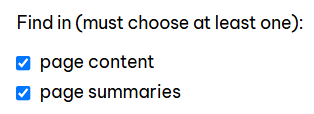
Previously, the "Find in" checkboxes were not in alphabetical order. To match our standard format across the entire UI, and the UI of the listing on the details page, we have reordered the checkboxes so that they are listed as "page content" followed by "page summaries."
| Before: | After: |
 |
 |