Google Search Console
Search Console, previously called Webmaster Tools, is a free service provided by Google to monitor, maintain, and troubleshoot your Google Search results.
Verify your site with Google Search Console
For Google to verify your site, your homepage must be public, and your site cannot be private.
- Go to Google Search Console to register.
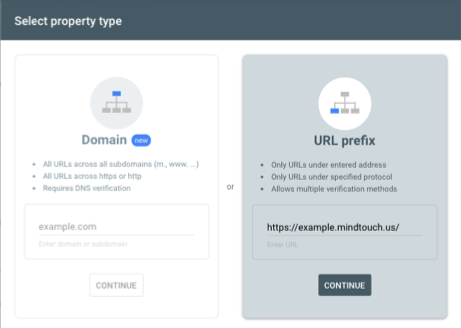
- Select the URL prefix option, enter your NiCE KM site URL, and click Continue.
- In the Verify ownership window, select the HTML tag option.
- Copy the HTML meta tag provided by Google.
- Add the meta tag to the <head> section of your NiCE KM site:
- Navigate to Control Panel > Branding > Custom HTML.
- Add the HTML meta tag provided by Google in Page HTML Head.
- Click Save.
- Return to Google Search Console to complete verification of your site.
Breadcrumbs report
NiCE KM already uses structured data for breadcrumbs as part of Technical SEO automatically handled by NiCE KM. Google added a new Breadcrumbs report to Search Console in September 2019.
The new Breadcrumbs report is showing a Missing field "itemListElement" error for some NiCE KM sites. This error may impact how breadcrumbs appear within Google search rich results.
NiCE KM Engineering is currently investigating to resolve the issue.